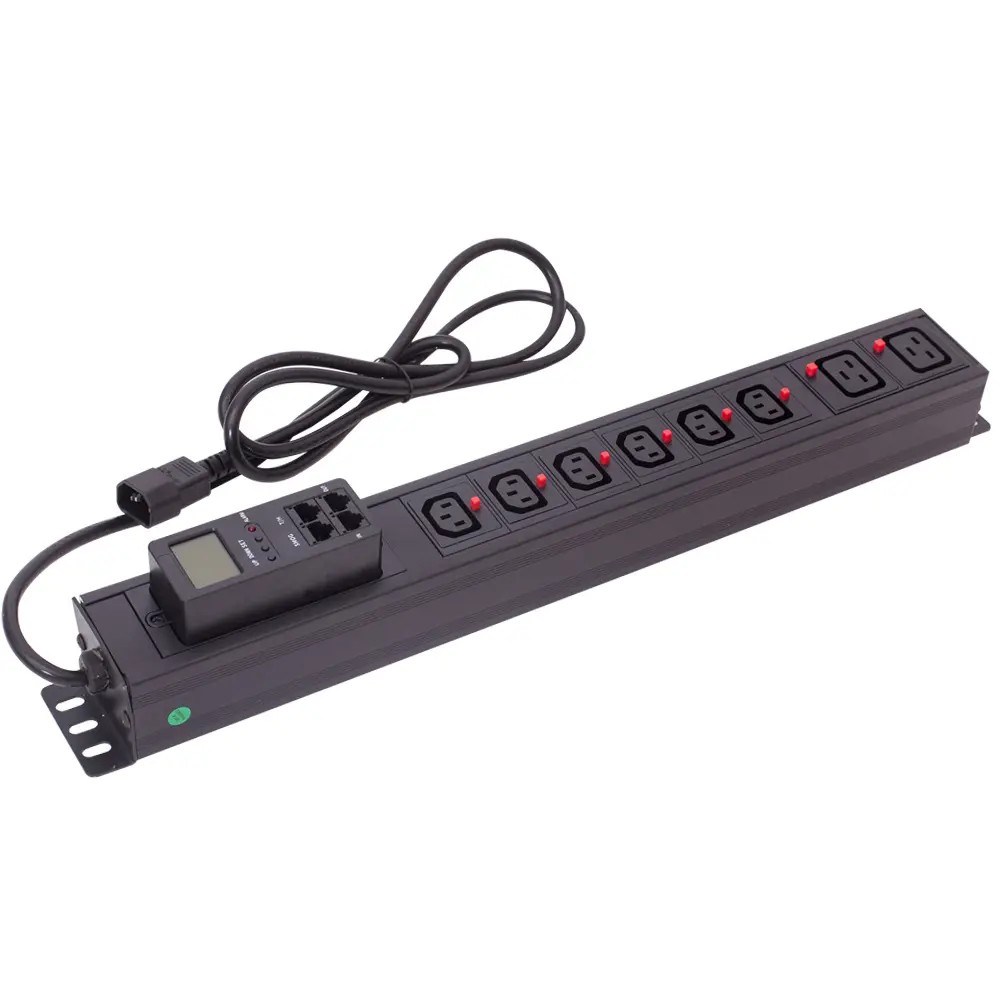
How to get PDU IP address?
There are several simple ways to find the IP address of a smart PDU, including checking the device label, using a network management tool, or...


+86 15867381241

Selecting the right power distribution unit (PDU) for your server rack is essential for maintaining reliable power delivery, improving energy efficiency, and supporting future infrastructure growth. The wrong PDU configuration can lead to power overloads, limited scalability, and inefficient rack management, while a properly matched solution helps ensure stable and efficient data center operations.
This guide explains how to choose the right PDU step by step, covering key factors such as power capacity, outlet compatibility, mounting options, PDU types, monitoring features, and safety standards to help you select the best fit for your rack environment.
The first and most critical step is defining your total rack power load, both for current equipment and planned future expansion. An undersized PDU causes overload risk and downtime; an oversized unit wastes budget and rack space.
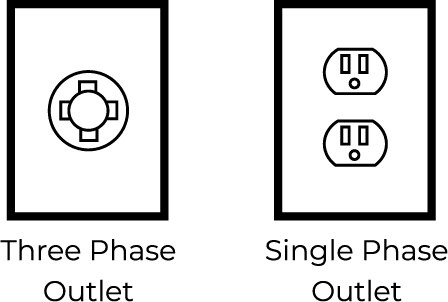
Your facility’s incoming power type is the foundational decision. Each configuration has distinct advantages for capacity, efficiency, and scalability.
| Feature | Single-Phase | Three-Phase |
|---|---|---|
| Typical Power Capacity | Up to 20kW per rack | 30kW+ per rack |
| Efficiency Profile | Standard for low-density loads | Higher efficiency for medium/high-density loads |
| Best For | Small server rooms, office closets | Enterprise data centers, high-density AI/Cloud racks |
| Installation Cost | Lower upfront cost | Lower long-term cost per kW |
| Wiring Requirements | Higher amperage per circuit, thicker cabling | Lower per-leg amperage, thinner cabling |
For context: a 15kW rack running on single-phase power requires 125A circuits and heavy-gauge wiring, driving higher installation costs. The same load on three-phase power splits across three legs, requiring only ~42A per leg, simplifying installation and reducing line losses. Three-phase power is the standard for commercial data centers due to its scalability and efficiency.
Tip: If you plan to add servers or high-density equipment within 2–3 years, opt for a three-phase PDU with spare capacity to support seamless growth.
Rack power draw varies widely by use case. Typical per-rack power ranges include:
As a baseline, a medium business rack often uses a 30A 208V three-phase rack-mounted PDU (8.6kW capacity). For single-phase setups, a 60A unit delivers roughly 8.4kW. To accommodate future growth, a 50A 208V three-phase PDU provides up to 14.4kW of capacity, eliminating the need for early replacement.
For maximum reliability, pair your PDU with redundant power paths and backup infrastructure aligned with your data center tier level:
| Tier | Description | Expected Uptime | Annual Downtime |
|---|---|---|---|
| Tier 1 | Basic single-path power and cooling, no redundancy | 99.671% | 28.8 hours |
| Tier 2 | Partial redundant power and cooling components | 99.741% | 22 hours |
| Tier 3 | Fully redundant power and cooling, maintainable without downtime | 99.982% | 1.6 hours |
| Tier 4 | Fully fault-tolerant, dual-powered all components | 99.995% | 0.4 hours |
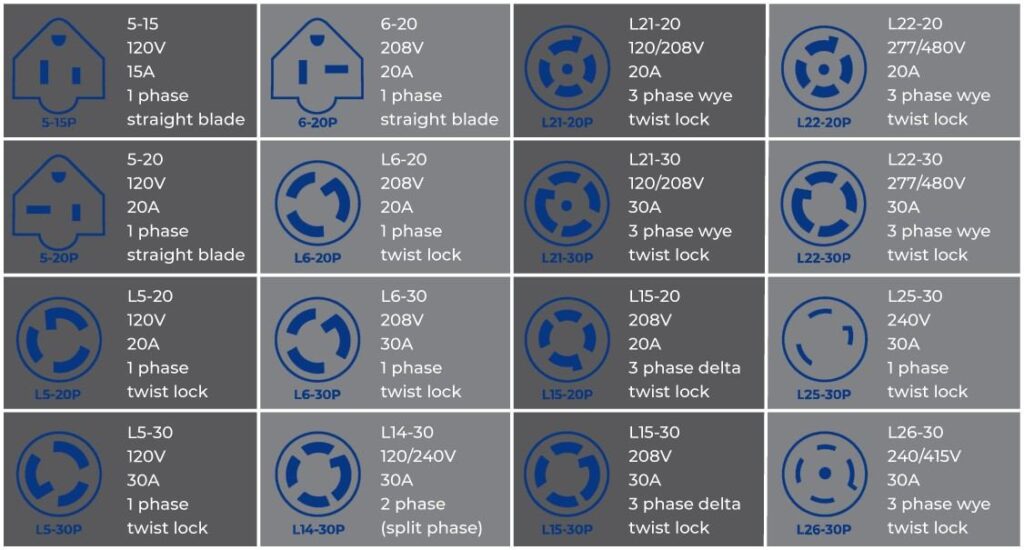
Even a correctly sized PDU will cause problems if its plugs and outlets do not match your equipment. Mismatched connectors require adapters, which introduce failure points and safety risks.
Common server power connector standards include IEC C14, IEC C20, Schuko, NEMA, IEC C13, and IEC C19. Select a PDU with inlet plugs that match your facility’s power receptacles, and outlet types that match your server and network equipment power cords.
Proper matching ensures stable power delivery, protects equipment from damage, and streamlines installation. Reputable PDU manufacturers offer multiple plug and outlet configurations to match regional and equipment-specific standards.
Ensure the PDU has enough outlets for all current rack equipment, plus 10–20% spare outlets for future additions. Also consider cable length and routing:
Customizable PDU options allow you to select specific plug types, outlet counts, and cable lengths to fit your exact rack layout, minimizing wasted space and power loss from adapters.
Mounting style impacts rack space utilization, accessibility, and airflow. There are two primary configurations: vertical (0U) and horizontal (1U/1.5U).
| Mounting Style | Space Utilization | Accessibility | Best For |
|---|---|---|---|
| 0U Vertical PDU | Mounts to rack side rails, uses zero front-facing rack units | Less accessible, mounted along the rack edge | High-density, fully populated racks |
| 1U Horizontal PDU | Occupies 1U of front rack space | Easy to reach and view | Small racks, frequently changed environments |
| 1.5U Horizontal PDU | Balances outlet density with rack space | Improved access over 1U models | Mid-density racks needing more outlets |
Additional detailed comparison:
| Factor | Vertical PDUs | Horizontal PDUs |
|---|---|---|
| Rack Space | Zero-U side mounting, saves active rack space | Consumes 1–2U of standard rack space |
| Outlet Density | Up to 60+ outlets, ideal for high device counts | Fewer outlets, easier to manage |
| Airflow | Minimal airflow obstruction, better rack ventilation | Can impede airflow if placed incorrectly |
| Installation | Requires side mounting hardware, more cable planning | Simple tool-free installation, easy cable management |
Note: Confirm your rack has compatible side mounting points before selecting a vertical PDU. Horizontal PDUs are universally compatible with standard 19-inch rack rails.
Vertical PDUs preserve active rack space for IT equipment and support cleaner cable management by separating power and network cables, reducing signal interference and improving airflow. Horizontal PDUs are preferable for environments where staff need frequent physical access to outlets and power controls.
For both styles, plan cable routing carefully: use cable ties and organizers, label all circuits, and use dedicated cable managers to keep power and data cables separated.
PDUs are available in four core functionality tiers, each designed for different monitoring, control, and budget needs.
| PDU Type | Core Features | Primary Use Case |
|---|---|---|
| Basic PDU | Passive power distribution only, no data or monitoring | Low-priority racks, small environments with no remote management needs |
| Metered PDU | Local display shows load level, no network connectivity | Budget-friendly overload prevention, basic capacity tracking |
| Monitored PDU | Network-connected remote viewing of voltage/power, alerts, event logging | Medium-density racks, capacity planning, remote visibility |
| Switched PDU | Remote per-outlet on/off control + full monitoring + scheduling | Remote troubleshooting, load shedding, edge facilities with no on-site staff |
Smart (monitored and switched) PDUs deliver the most operational value:
| Feature | Benefit |
|---|---|
| Real-time power visibility | Live view of rack power consumption and load balance |
| Remote monitoring | Early problem detection and faster issue resolution |
| Per-outlet control | Remote server reboots, idle device power-down, load shedding |
| DCIM system integration | Unified visibility, simplified capacity planning |
Smart PDUs reduce energy waste by identifying underutilized and idle servers, and support targeted efficiency improvements. They also help optimize cooling by correlating power draw with rack temperature, reducing cooling overhead.
All quality PDUs include core safety features to protect connected equipment:
Server rack environments often run at elevated temperatures, and edge deployments may face dust and humidity. Look for PDUs built with durable metal housings (such as aluminum alloy) for long service life. For harsh environments, sealed enclosures protect against dust and moisture ingress. Many intelligent PDUs also include integrated temperature and humidity sensors to monitor rack conditions and prevent overheating.
Third-party certifications validate that a PDU meets global safety, quality, and environmental standards.
| Certification | Description | Core Benefit |
|---|---|---|
| ISO 9001 | International quality management standard | Consistent manufacturing quality |
| CE | EU safety, health, and environmental compliance | Valid for EU market deployment |
| UL | North American electrical safety certification | Proven safety for US/Canada installations |
| RoHS | Restriction of hazardous substances | Environmentally compliant materials |
| VDE / GS | German/European electrical safety standards | Rigorous electrical safety validation |
| CB | International electrical certification scheme | Simplifies multi-region compliance |
Reputable manufacturers test all PDUs against these standards to ensure safe, reliable performance across global markets.
Responsive technical support and a solid product warranty reduce downtime risk. Look for vendors that provide post-sales support, troubleshooting guidance, and clear maintenance recommendations to maximize PDU service life.
Use this step-by-step checklist to finalize your choice:
For most growing commercial environments, customizable PDUs that support tailored outlet configurations, communication protocols, and sensor add-ons deliver the best long-term value. High-quality manufacturing with rigorous testing ensures reliable performance even in dense, 24/7 data center environments.
A PDU (Power Distribution Unit) is a rack-mounted device that distributes electrical power to servers, switches, and other IT equipment. It provides safe, organized power delivery and helps prevent overloads and equipment damage.
A metered PDU shows power load on a local display but has no network connection. A monitored PDU connects to the network, allowing remote viewing of power data, automated alerts, and historical logging.
Yes. Quality PDUs include overload protection, overcurrent protection, and surge suppression to block excess power and voltage spikes from damaging connected IT equipment.
Match the PDU inlet plug to your facility’s wall receptacle standard, and match the PDU outlets to the power cords on your servers and network equipment.
For medium and large data centers, yes. Smart PDUs reduce downtime by enabling remote troubleshooting, cut energy waste through load optimization, and simplify capacity planning, delivering a clear return on investment.